Two years ago, I was sceptical about AI video for serious training. The avatars were stiff, the lip-sync drifted, and anyone paying attention could tell within five seconds they were watching a robot read a script.
That's no longer true, and I want to be honest about how much has changed. We've shifted a meaningful chunk of our own production to AI video where it makes sense. But this is the whole point of this article: "where it makes sense" is doing a lot of work in that sentence. The gap between what these tools are sold as and what they actually do well is still wide, and if you buy into the marketing, you'll waste money and embarrass yourself in front of learners.
So this is the guide I wish someone had handed me. Eight tools worth knowing, what each one is genuinely good for, where each one breaks, and our own production benchmarks from using these in real client work, including the brand-new arrival that's trying to reinvent how editing works. If you're evaluating AI video for your training content right now, this should save you a few hundred dollars of trial-and-error and a few weeks of false starts.
Let's start with the single most important distinction, because almost every buying mistake I see traces back to missing it.
First, Understand the Two Completely Different Categories
People say "AI video" as if it's one thing. It's two things, and they solve completely different problems.
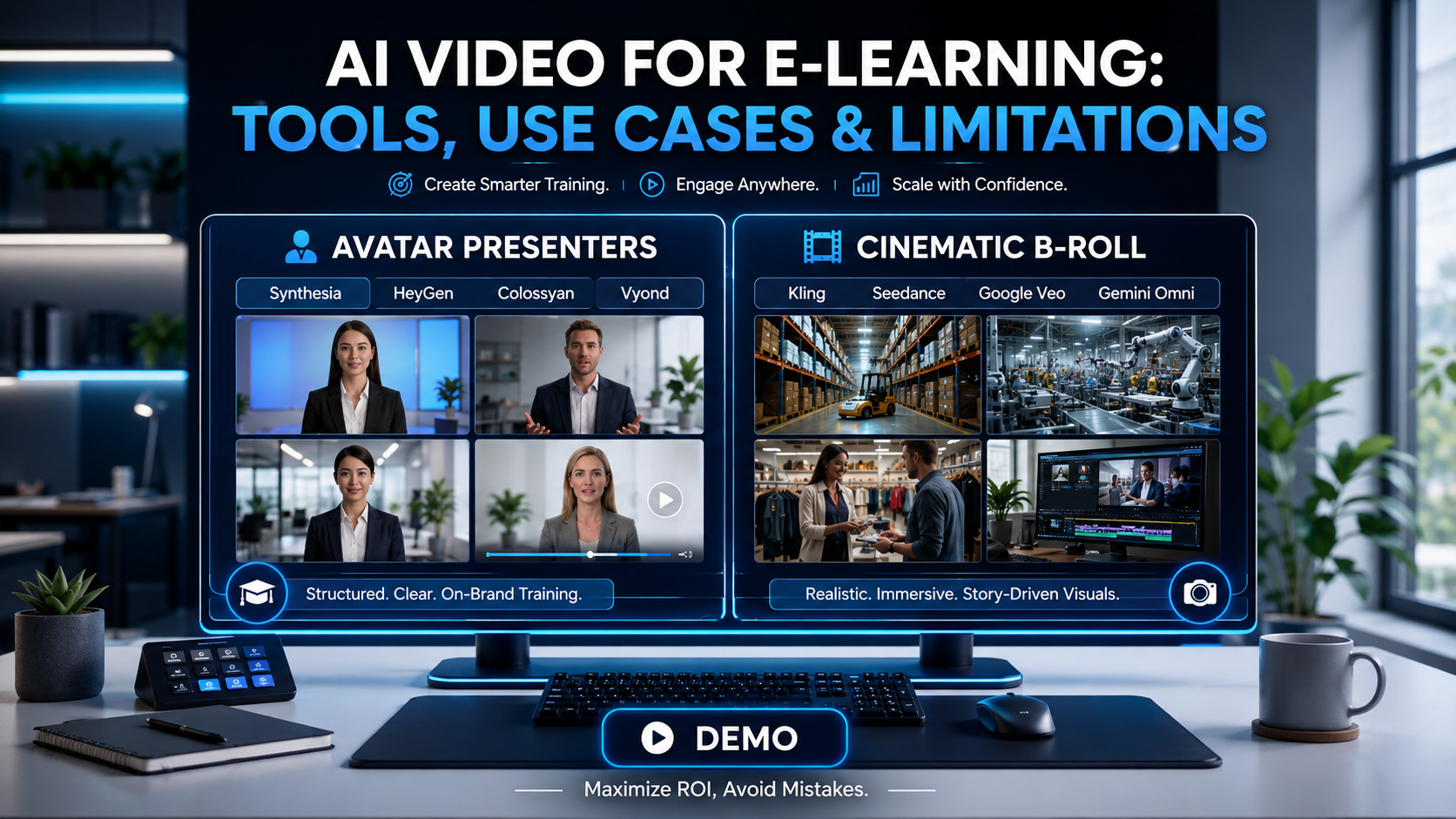
Avatar-based platforms take your script and produce a video of a realistic AI presenter delivering it on camera. Think talking-head explainer, a presenter walking you through a policy, a virtual instructor. The output looks like a professionally filmed talking-head video. This is Synthesia, HeyGen, Colossyan, and D-ID. For structured training content, this is the category you'll live in 90% of the time.
Cinematic generators take a text description and invent original footage, a warehouse scene, a customer walking into a store, and a drone shot over a factory. This is Kling, Seedance, Google Veo, and Runway. These are spectacular for B-roll and creative sequences, and almost useless for delivering structured instructional content, because they generate what they imagine, not what your script says. The AI generates a creative video from your description, which is exactly what filmmakers want and exactly what a compliance officer does not want.
Hold that distinction in your head as we go through the tools. Buying a cinematic generator to produce compliance training is like buying a sports car to haul cement. Wrong tool, right enthusiasm.
The Eight Tools Worth Knowing in 2026
1. Synthesia - The Enterprise Default
Synthesia is the tool most large L&D teams end up on, and for defensible reasons. It's become the default choice for corporate training, internal communications, and L&D teams, with a client list that includes Amazon, the BBC and Reuters.
What it's genuinely good at: structured, on-brand, consistent presenter videos at scale. Synthesia offers structured editing with 240+ avatars and 160+ languages. The slide-based editor feels like building a PowerPoint, so your team picks it up fast. Its 2026 update added AI Playground for B-roll generation without leaving the platform, which neatly solves the avatar-vs-cinematic split inside one tool.
Where it bites: pricing and gating. The Starter plan begins at $18/month (annual) with 120 minutes of video per year, that's 10 minutes per month. More painfully for L&D buyers, critical features for business use, like SCORM export and one-click translation, are locked behind the custom-priced Enterprise tier. For a platform marketed at training teams, gating LMS export behind enterprise pricing is genuinely annoying. Also worth knowing: multiple reviewers in regulated industries have reported legitimate content being flagged by aggressive content moderation.
Our take: If you're an enterprise that values consistency, governance and brand control over cutting-edge realism, this is the safe choice. Budget for the Enterprise tier from day one if you need SCORM.
2. HeyGen - The Realism and Flexibility Leader
HeyGen has pulled ahead on raw avatar quality. It wins on avatar naturalness with 100+ avatars and 175+ languages, and its Avatar IV technology is, in our testing, the most convincing on the market.
What it's good at: realism, speed, and custom avatars without the enterprise price wall. HeyGen includes instant avatar creation in paid plans, record a short video of yourself and generate your AI clone in minutes, whereas Synthesia charges $1,000 per year for custom avatars and requires professional filming over several weeks. For SME-led content where you want your actual expert on screen, that's a big deal. Pricing starts around $29/month on the Creator plan ($24 billed annually) with 200 monthly credits at 1080p.
Where it bites: the credit system. HeyGen's "unlimited" marketing creates confusion because premium features like Avatar IV and lip-sync translation consume premium credits that vary by plan and aren't clearly disclosed upfront, and many users report unexpected costs when premium credit allocations run out mid-month. They've improved this as of February 2026. HeyGen added upfront cost estimates before generating premium content, but you still need to budget carefully.
Our take: Best output quality, best for putting real SMEs on screen, best for multilingual content. The credit accounting demands more attention than Synthesia's flat plans.
3. Colossyan - The L&D-Native One
Colossyan is the tool built specifically for training, and it shows. It's not trying to be a marketing video tool.
What it's genuinely good at: interactivity and the full training lifecycle. Its branching quiz builder stands above anything else in this category for structured compliance training. You can build interactive paths where the viewer makes choices, answers questions, and receives different content based on their responses. It does branching scenarios, in-video quizzes, scored assessments that feed into your LMS via SCORM, and doc-to-video conversion from a Word doc or slide deck, all in over 100 languages.
Where it bites: it's not the best pure-video tool. Rendering times are noticeably slower. A short video HeyGen delivered in 2 minutes took over 10 minutes on Colossyan, and the avatar library is narrower with more limited voice options. Outside the compliance-and-assessment niche, it doesn't compete with the top platforms on raw video quality. Business plan runs around $62/month annually.
Our take: If interactive, assessed, SCORM-tracked video is your core need, this earns its place. If you just need clean presenter videos, the realism leaders beat it.
4. Vyond - When You Want Animation, Not Avatars
Sometimes the smartest move is to not attempt photorealism at all.
Vyond doesn't try to look photorealistic; the animated style is intentional, and for many business use cases, it's the right aesthetic choice. For teams that want to avoid the uncanny valley entirely, Vyond sidesteps the problem by never trying to look human. It stands out for a huge animated prop library and character styles, over 40,000 props, 70+ languages, auto lip-sync, usually priced around $25/month or $299/year.
Our take: Excellent for process explainers, scenario vignettes, and anything where a friendly animated style fits better than a realistic human. We reach for this on soft-skills and culture content surprisingly often.
5. Kling - The Benchmark-Leading Cinematic Generator
Kling, from Kuaishou, has become the tool to beat in the cinematic category, and you should understand it precisely so you don't misuse it. It sits at or near the top of the ELO quality benchmarks in 2026, with best-in-class human realism and a Motion Control feature reference-video motion transfer, motion brush, and first/last-frame chaining that no avatar tool offers. The flagship Kling 3.0 generates native 4K at 60fps, and pricing is aggressive, starting around $6.99/month with commercial rights included.
Where it bites for training: the same wall every cinematic tool hits, no presenter-led delivery and no script fidelity. It also has no in-platform editor (you accept, regenerate, or export to another tool), clip lengths are short, and the Chinese data jurisdiction, plus thin customer support, are real considerations for enterprise buyers.
Our take: The strongest cinematic B-roll engine available, and cheap enough to experiment with freely. Use it for atmosphere and creative clips, never to deliver instruction.
6. Seedance 2.0 - The Efficient Cinematic Challenger
ByteDance's Seedance 2.0 arrived in February 2026 and immediately topped the Artificial Analysis Elo leaderboard, outperforming Veo 3 and Runway Gen-4.5 at launch. It co-generates video and synchronised native audio in a single pass, handles text-to-video and image-to-video with first/last-frame control, and is unusually strong at preserving character consistency and camera movement from reference material. Its real differentiator is cost: roughly $0.14 per second of generated video, with a faster, cheaper variant for batch work.
Where it bites for training: identical to Kling, it invents footage; it doesn't deliver scripts. International access is also fragmented (Dreamina credits, BytePlus API, third-party platforms), and several official entry points still expect a Chinese phone number, with watermarks on free tiers.
Our take: The best price-to-quality ratio in cinematic generation right now, and excellent for high-volume B-roll variants. Still a B-roll tool, not an instructional one.
7. Google Veo 3.1 - The High-Fidelity Reference
Google's Veo wins on visual fidelity: it reaches among the highest resolutions and longest durations in this group, with native audio and near lip-sync.
The shared, non-negotiable limitation for training: cinematic generators share the core limitation of no presenter-led delivery and no script fidelity. They also remain inconsistent over length, making them better suited to short creative clips than corporate workflows. Access is also gated and pricey at the top end; Veo 3.1 is primarily available through Google Flow behind premium subscriptions, with the top Google AI tier running as high as $249.99/month.
Our take: Use this for B-roll and atmosphere, not instruction. A 6-second Veo shot of a busy warehouse to open a safety module is perfect. A Veo attempt to "explain the three steps of the returns process" you'll fight it for hours and lose.
8. Gemini Omni - The Conversational Wild Card
The newest entry on this list, and the one I'm watching most closely. Google launched Gemini Omni at I/O 2026, with the first model, Omni Flash, going live on May 19 in the Gemini app, Google Flow and YouTube Shorts. It doesn't fit cleanly into either category above, which is exactly what makes it interesting.
What it's genuinely good at: editing through plain conversation. Most tools run in one direction: prompt in, clip out. Omni takes any mix of text, images, audio and existing footage and lets you reshape a scene by describing the change you want, with each instruction building on the last so characters, lighting and objects stay consistent across edits. Google's own framing is "like Nano Banana, but for video." For an L&D team, the practical pull is iteration: when a reviewer says "make the office warmer and lose the second presenter," you say that, rather than re-rendering from scratch. It also includes an avatar feature, a video clone of yourself, gated behind a read-aloud verification step to discourage deepfakes, and every output carries an invisible SynthID watermark.
Where it bites: it's early. Clips are capped at 10 seconds, raw generation quality currently trails Seedance 2.0, and speech and audio editing, plus a paid Pro tier, aren't available yet. As with the other cinematic generators, it doesn't do presenter-led, script-faithful instructional delivery; it's a creative and editing tool, not a course engine.
Our take: The conversational-edit model is the most genuinely new idea in this space in a while, and the consistency-across-edits behaviour solves a real production headache. But it's a v1: use it for short creative sequences and rapid B-roll iteration, keep it away from your instructional spine, and watch how it matures over the next few releases.
(D-ID, the lightweight photo-to-talking-head option, is also worth a mention for fast, low-stakes internal updates, which turn a photo and a script into a quick presenter clip without committing to a full platform. Useful for quick announcements; not where I'd build a flagship course.)
Quick Comparison
Tool | Category | Best for | Watch out for | Entry price (approx.) |
|---|---|---|---|---|
Synthesia | Avatar | Enterprise consistency, governance, and brand control | SCORM gated to Enterprise; aggressive moderation | ~$18/mo annual |
HeyGen | Avatar | Realism, custom avatars, multilingual | Credit accounting complexity | ~$24–29/mo |
Colossyan | Avatar | Interactive, assessed, SCORM-tracked training | Slow renders, smaller avatar library | ~$27–62/mo |
Vyond | Animation | Process explainers, scenarios, soft skills | Not photorealistic (by design) | ~$25/mo |
Kling | Cinematic | Benchmark-leading B-roll, motion control, 4K | No script fidelity; data jurisdiction; no editor | from ~$6.99/mo |
Seedance 2.0 | Cinematic | Cheap high-quality B-roll, native audio, batch | No script fidelity; fragmented access | from ~$9.60/mo |
Google Veo 3.1 | Cinematic | High-fidelity B-roll, native audio | Gated access, high top-tier cost | up to ~$250/mo |
Gemini Omni | Cinematic / editing | Conversational editing, multimodal input, consistency | Early v1; 10s clips; quality trails Seedance | Free in Gemini app (at launch) |
Pricing shifts constantly in this market. Treat these as directional and confirm on the vendor's site before you buy.
The Use Cases Where AI Video Genuinely Wins
After two years of production use, here's where we now reach for AI video without hesitation.
Compliance and policy training. Repeatable, script-driven, frequently updated. AI video shines here because you can update the text, and the video regenerates, no reshoots, no new production cycle. A real example of the payoff: Carmine Valente, VP of Information Security at Paramount, replaced an average of 10 hours of walkthrough meetings each month with AI-generated videos, freeing up 120 hours a year for actual security work.
Product and process updates. When your content changes quarterly, the ability to edit a script and re-render in minutes is transformative. This is the single biggest workflow win we've experienced.
Multilingual rollouts. Generate once, localise across your whole workforce in the same workflow. What used to be a multi-week, multi-vendor localisation project becomes an afternoon.
SME-led microlearning. With HeyGen's instant avatars, your actual expert can "present" content they'll never have to film. Huge for getting busy SMEs on screen.
The Real Limitations Nobody Puts in the Sales Deck
Here's the honest part. These are the limitations we've hit in production, and you will too.
The uncanny valley is real in emotional content. Avatars are excellent at delivering information. They are still not good at conveying genuine emotion. For sensitive content, bereavement policy, mental health, and serious safety incidents, a real human still outperforms. Don't let an avatar deliver something that needs a heartbeat behind it.
Re-rendering has a hidden cost. Every script edit consumes rendering resources on these platforms. If your team updates content frequently, ask about rendering limits and speed before signing anything. This catches teams off guard in month three.
Compliance documentation gaps. If you're in healthcare or financial services, read the fine print. As of early 2026, neither HeyGen nor Synthesia had published HIPAA compliance documentation on their security pages, despite growing demand from regulated buyers.
Total cost of ownership is higher than the entry price. For a 25-person team, the 12-month total cost of ownership ranges from $7,500 to over $25,000, depending on the platform and usage. The $18/month headline is not your real number.
Gesture and naturalness still aren't perfect. Avatars have improved enormously, but extended viewing still reveals a slight repetitiveness in gestures and rhythm. For 3-minute modules, unnoticeable. For 30-minute lectures, learners feel it.
Cinematic tools will waste your time on structured content. Worth repeating. If you try to make Kling, Seedance or Veo deliver precise instructional steps, you'll burn hours and budget for output you can't use.
How We Actually Use These in Production
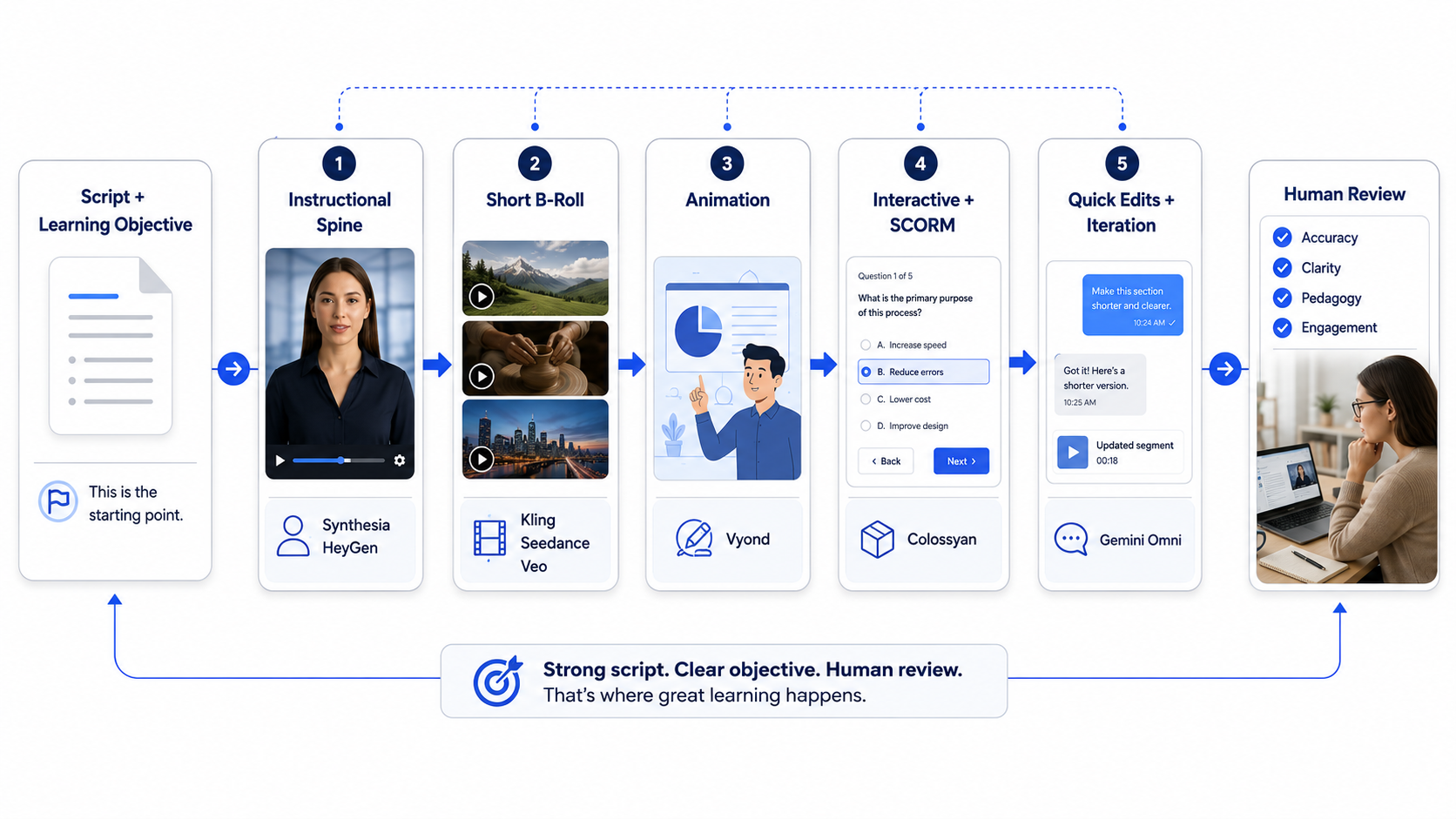
Our working model, for what it's worth: avatar platforms (Synthesia or HeyGen, depending on the realism need) for the instructional spine, cinematic generators (Kling or Seedance for benchmark quality and cost, Veo for fidelity) for short B-roll only, Vyond when an animated register fits better than a human, and Colossyan when the client needs interactivity and SCORM-tracked assessment baked into the video itself. Gemini Omni is the new tool in the mix; we're using it for quick conversational edits and B-roll iteration, while keeping a close eye on how it develops.
The tool is never the hard part. The hard part is the same as it's always been: a tight script, a clear learning objective, and a human reviewing the output before it ships. AI video changes the production economics dramatically. It does not change what makes a video teach something.
The Honest Bottom Line
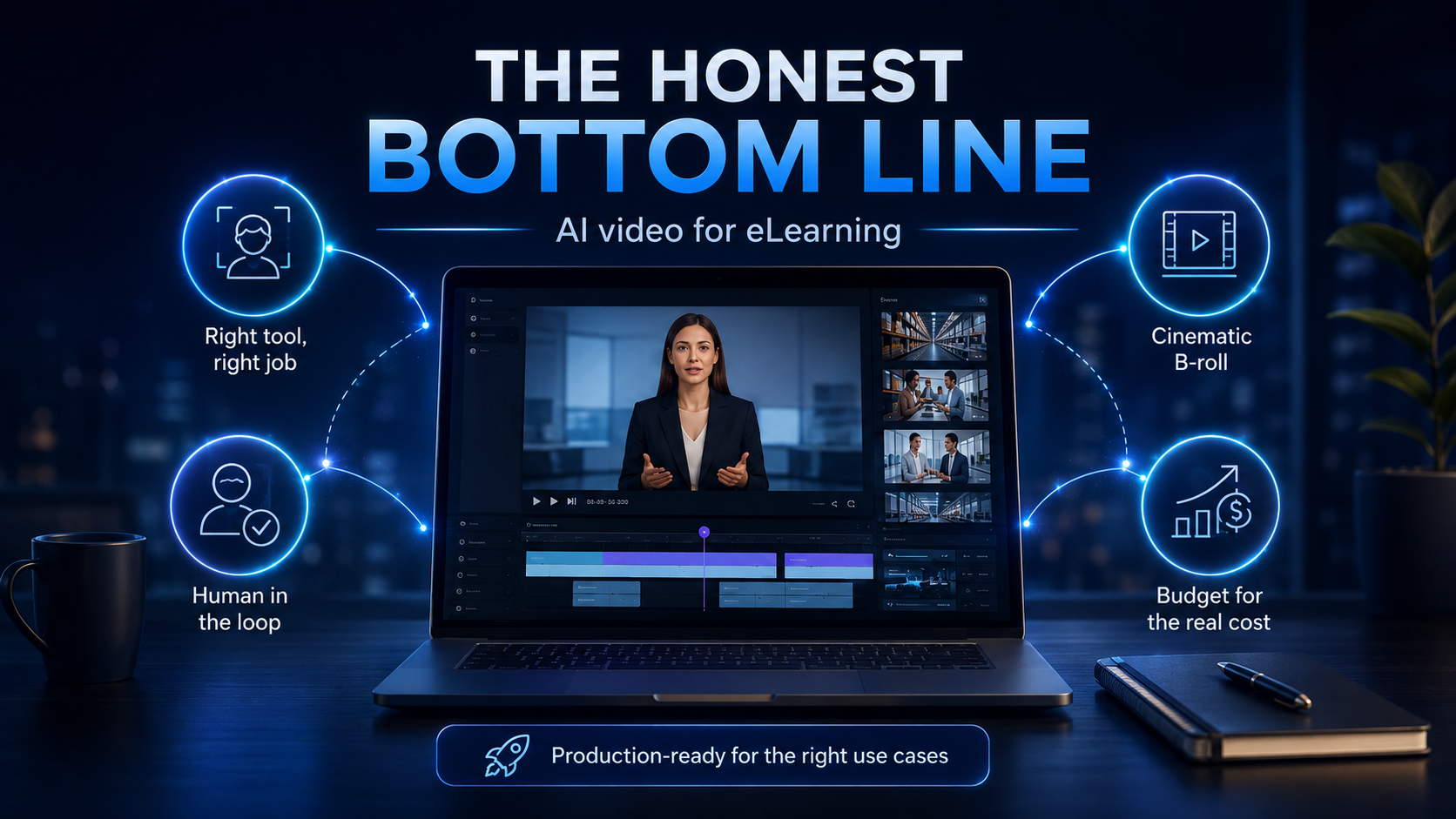
AI video for eLearning crossed the line from "interesting experiment" to "production-ready for the right use cases" sometime in the last eighteen months. I didn't expect to be saying that this soon, and I'm glad to be wrong about my earlier scepticism.
But "production-ready for the right use cases" is not "ready for everything." Use avatar tools for structured, script-driven, frequently-updated content. Use cinematic tools and newer arrivals like Gemini Omni for B-roll and creative work only. Keep a human in the loop on anything emotional or high-stakes. And budget for the real total cost, not the headline price.
Get those things right, and AI video will genuinely transform your production economics. Get them wrong, and you'll produce a library of slightly-off robot videos that learners quietly resent.
If you'd like help working out which tools fit your specific content mix and seeing a sample module built from your own source material across a couple of these platforms, book a demo with our AI Content Solutions team. We'll show you real output, share our production benchmarks, and be straight about where AI video will and won't serve your learners.